

Where to buy Indiana Fever tickets
Start at the Indiana Fever’s official ticket hub. It routes you to single games, season plans, group tickets, premium seating and the account that manages tickets you already hold. For a home game, look for an event listing that identifies the opponent, date and venue before you choose seats. Gainbridge Fieldhouse is the Fever’s home arena in downtown Indianapolis, and the Fieldhouse’s Fever page links back to the team’s ticket channels.
If you are planning a trip around one opponent, start with the Indiana Fever schedule and then follow the team’s ticket link. A schedule helps you choose the event. The seller’s page gives you the current purchase status and, when seating is available, the opportunity to choose a section and row. Check the venue name again at checkout. A search for Fever tickets can also bring up games where Indiana is the visitor, and the ticket seller for those events may belong to the host team.
Are 2027 single-game tickets on sale?
As of November 27, 2026, the official marketplace displayed no upcoming Fever games, and the team and arena pages checked did not confirm a public 2027 single-game on-sale date. The team’s single-game page remains the place to look. The availability snapshot will change. Look for a dated team announcement or a specific game with a working seat-selection link before you make plans around a listing. Indiana Fever official marketplace
The team has issued dated sale announcements before. In January 2026, it paired its schedule release with an on-sale time for select games. Those dates applied to the 2026 season. When you check for 2027, take the season label as seriously as the day and time. A result about an earlier opening night or a listing for a package can sit in the same search results as the official route for individual games. Fever’s 2026 schedule and ticket announcement
What the 2027 season-ticket waitlist offers
The team’s membership page advertises a 2027 priority waitlist with a deposit option. It describes a full plan of 26 home games and a half plan of 13. Those are the counts the team advertises for the packages. Before placing a deposit, confirm the amount, how it is applied, how seat offers are made and what happens if the available locations do not work for you. A seat assignment and the list of included games should come from the offer you receive. Existing members should check their renewal terms in their account. Official season plans and waitlist
Season length also matters when you compare coverage from one year to the next. The guide to the expanded 2027 season explains the league calendar. Use the Fever’s current package terms for the specific seats and games a membership would include.
Which ticket plan fits the games you can attend?
If the trip is for one game, your decision starts with the date. A single-game ticket gives you the choice to pay for the game and location that fit. If several home dates appeal to you, list them before comparing a half plan with individual seats. The plan’s advantage depends on how many of its dates you can actually use. A weekday tip and a weekend afternoon can feel interchangeable on a schedule until you add work, school or a drive home.
For a fair comparison, ask for the total package price and the exact seat assignment or seat options. Divide the total by the number of games you expect to attend. Compare that amount with the actual checkout price for individual games at comparable locations once those listings are active. Consider the cost of getting downtown for each visit. If you usually sit with someone, run the calculation for both seats. A schedule that works for one person may be harder to share across a full season. The WNBA season-ticket budgeting guide explains why renewals also deserve a fresh comparison.
The team describes playoff seating priority with its full-season product. If playoff access matters to you, ask how the seat is claimed, when payment would be due and which games are covered by a separate postseason offer. That gives you a decision you can compare with the regular-season plan. The WNBA playoffs and bracket explain when the postseason comes into play. Confirmation of seat availability comes from your membership offer. Fever full and half-season plan information
Group tickets and premium seats
The Fever advertises group tickets for parties of 10 or more. Start with your headcount, including anyone who needs an accessible place or a companion seat. Ask how many seats can be assigned together and when the group has to commit. If the headcount is still open, get the deadline for adding seats and how that affects the block. Some experiences have their own minimums, so ask which dates and sizes qualify before building your outing around one. Fever group ticket options
Premium seating is another decision. The team offers suites and spaces such as clubs, with different uses for a season commitment or a single entertainment event. Find out how many admissions come with the exact offer, which game it covers and whether food, parking or access to a particular lounge is included. For a group celebration, that written description matters as much as the position of the section. The premium rental priority route is also separate from the season-seat waitlist. Official Fever premium experiences
How to choose seats at Gainbridge Fieldhouse
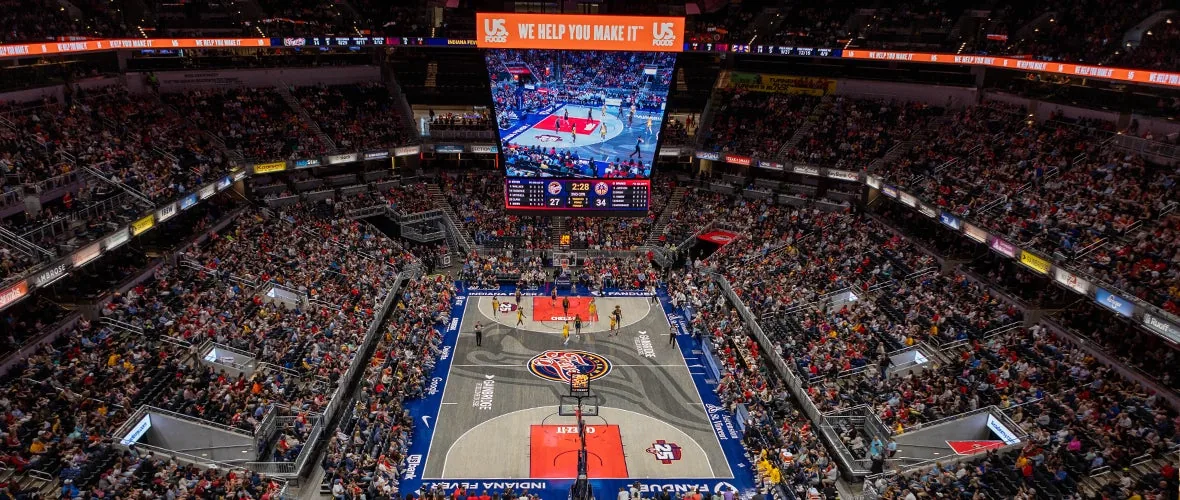
The Fever links to a 3D view of Gainbridge Fieldhouse. Use it to picture where the court sits in relation to the section, then return to the seat map for your specific game to look at the row and seat numbers. When comparing options, decide what would make the game enjoyable for your group. Some fans want to see the shape of every play, some would trade that for a closer view of the near basket, and some need a route to the seat that suits their mobility.
Sightlines, rows and grouped seats
If you want to watch how a team moves off the ball, compare sideline views near midcourt, including a few rows farther back or on a higher level. From there, seeing both baskets and the weak-side movement may be easier. Seats close to the baseline put drives and rebounds at the near basket in view. The basket support or your viewing angle can matter more at the far end. Before paying for proximity, look at both ends of the floor from the available viewpoint.
Compare row location within a section as well as the section number. Railings, nearby aisles and the slope of the rows can change what you see. On the seller’s map, confirm how many seats sit together. A listing that meets the quantity you searched for can still be unsuitable if your party needs an aisle or if other listings are in neighboring rows. If you plan to leave your seat frequently, look at the path back to the concourse before you choose a spot in the middle of a long row. Read any view disclosure and confirm every seat on the order. Ticketmaster’s interactive map instructions
Accessible seating and companion tickets
Gainbridge lists wheelchair locations and modified aisle seats. On the event’s Ticketmaster page, use the accessibility filter to view the options for that game, or ask the Gainbridge Fieldhouse box office for help. Its number is 317-917-2727. If you are attending with someone who needs a companion seat, match that seat to the accessible space before buying. The availability and type of seats can vary by event. The Fieldhouse also identifies elevators in the northeast area on all levels and a designated Pennsylvania Street drop-off.
If your access needs change after purchase, ask Guest Services or the box office about options. Exchange availability can depend on the event and inventory. Share your event and the seat information when you contact them so they can check whether the route, wheelchair space or modified aisle position will work for your group. Gainbridge Fieldhouse accessibility guide
What to verify before paying for resale tickets
At Gainbridge Fieldhouse the box office identifies Ticketmaster as its verified online ticket platform. The team also names Ticketmaster as its resale partner. If you see primary and verified resale offers for the same event, compare them after selecting the number of seats you need. A primary offer starts with a ticket the organizer makes available. A resale offer is listed by an existing ticket holder. Both appear on the same map when available, so check the label on each listing before making a price comparison. Gainbridge Fieldhouse box office
Look at the order total and then examine the seat location behind that price. Ticketmaster describes its upfront price as including required fees, with applicable taxes or chosen delivery charges potentially appearing at checkout. If you are booking a pair, compare the total for both seats. An aisle seat on a higher level may serve you better than an inexpensive pair in a restricted-view location. The further trade-off is flexibility. Read the seller’s terms for event changes or delivery problems, particularly when the game is part of a larger travel plan. Ticketmaster’s all-in price explanation
Before paying, check the home and away order, the date, the venue, your row and the delivery method. For a season package, ask for the exact set of included games. For a listing with a delayed ticket release, look for the promised delivery window in the order. A retailer’s order confirmation tells you the purchase is recorded. The event ticket should appear in the account designated for delivery before you go to the building. If the event details disagree across sources, return to the team page and the venue listing and check which event you are buying.
If the ticket is coming from someone you know, ask them to use the official transfer route where the event allows it. You can confirm an accepted transfer when the ticket appears under the receiving account for the correct game. A barcode image cannot give you that account confirmation. If a seller offers only a forwarded picture or asks to be paid off the official platform, use the box office or an official listing to look for another option. Official Ticket Transfer instructions
How to enter with mobile tickets on game day
Gainbridge Fieldhouse uses mobile tickets. Open the order before leaving for the arena and confirm that the correct event appears on your phone. A direct marketplace purchase may live in your Ticketmaster account. A team membership or an order managed by the club may be in the Fever Account Manager linked from the team’s ticket page. The official Fever app also supports managing game tickets. Use the order confirmation to identify the right sign-in and check that you can retrieve every ticket your group needs. Indiana Fever official app
- Find the game. Open the event on your phone and match the time, venue and seat details with the order confirmation. If the event time was changed, verify the update on the arena or club site.
- Prepare the tickets. Add them to your phone’s wallet in advance when the option is available. Open the official ticket before arrival so you can spot a sign-in problem earlier. Gainbridge rejects screenshots at entry.
- Plan separate arrivals. When the event supports transfers, send tickets to anyone arriving on their own. Have each person accept the transfer and find the actual ticket in their account well before tipoff.
- Check the venue notice. Confirm door time, the entry route you want and which bag you can bring. The venue has published Fever-specific bag instructions for past games. Use the notice for your exact event, since rules can vary by event.
- Get help before scanning. If you cannot display the ticket, the venue directs fans to the box office on the day and advises having ID ready. Keep your order details available so staff can see where you purchased. Give yourself time to get help and to find the right concourse afterward.
Gainbridge also describes itself as a cashless venue. Bring a payment method that will work for any purchases you intend to make inside. If you are meeting friends, agree where to meet and who has each ticket before you get to the gates. That keeps the line moving and gives everyone time to find their seats while the teams are warming up. Gainbridge Fieldhouse mobile ticketing tutorial · Venue entry and visitor information
When a trip falls through, the Fever viewing guide covers television, streaming and replays.
Sign in with Google to join the discussion.